Cozy Little Corners Coloring Book: A Practical Asset for Creative Workflows and Product Development
In the expanding landscape of print-on-demand and self-publishing, the challenge is not just creating a product but building something that fits seamlessly into existing workflows. The Cozy Little Corners Coloring Book offers more than a collection of 50 printable illustrations. It serves as a functional resource for entrepreneurs, publishers, and creators who need ready-to-use content that can be deployed across multiple platforms with minimal friction. Whether you are designing a KDP interior, assembling a POD catalog, or looking for a reliable asset to support a creative side project, this coloring book delivers a structured solution.
What the Cozy Little Corners Coloring Book Actually Contains
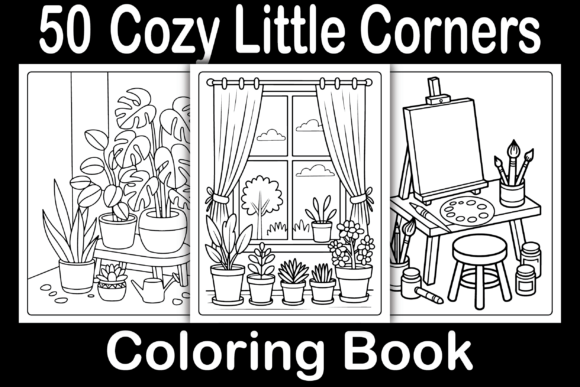
This digital printable package includes 50 original illustrations centered on intimate, comforting spaces. Each page presents a detailed black-and-white line drawing of a cozy corner, from window nooks and reading alcoves to kitchen breakfast spots and garden benches. The interior details are formatted at 8.5 x 8.5 inches with bleed, which means the PDF is production-ready for Amazon KDP uploads. You receive a single final PDF file alongside 50 JPG, PNG, EPS, and SVG format files. This multi-format approach means you can edit, resize, or repurpose the illustrations without needing to start from scratch.
For anyone working in publishing, print-on-demand, or digital product sales, the value lies in the format flexibility. The EPS and SVG files allow for vector editing, so you can adjust line weights, remove backgrounds, or combine elements for custom cover designs. The PNG and JPG files are immediately usable for previews, mockups, or social media promotion. The PDF is ready to upload directly to Amazon KDP after you create your cover.
Where This Coloring Book Fits in a Broader Workflow
A coloring book is often treated as a standalone product, but in practice it rarely exists in isolation. The Cozy Little Corners Coloring Book can be integrated into several stages of a product development cycle, whether you are an individual creator or running a small publishing business.
Before Launch: Asset Preparation and Planning
When preparing a KDP listing or a POD catalog, the illustrations in this collection serve as the raw material for your interior file. Because the PDF is already formatted with bleed at the correct trim size, you can skip the tedious step of adjusting page dimensions. This eliminates a common bottleneck in the publishing workflow. If you plan to offer a paperback edition, the interior is structurally sound from the start. The SVG files also allow you to create a matching cover by extracting a single illustration, adjusting its scale, and adding title text without needing to commission original cover art.
For creators who batch produce multiple titles, having a consistent source of cohesive illustrations is essential. The 50 pages in this set share a coherent theme, which means you can produce a single book with high page count rather than trying to assemble mismatched images from different sources. This consistency also helps with Amazon's algorithmic preference for complete, polished products.
During Production: Format Conversion and Customization
If you work with multiple print providers or platforms, the availability of EPS and SVG files becomes a practical advantage. You can convert the vector files to any required format, adjust the DPI for different printers, or even modify the line art to suit different age groups. For example, if you want to target a younger audience, you can use the vector files to thicken the outlines. If you are creating a digital version for tablet coloring apps, the PNG files with transparent backgrounds can be imported directly into Procreate or similar software.
The JPG files are useful for creating low-resolution previews that load quickly on Amazon product pages or Etsy listings. You can also use them in A+ Content modules on Amazon to show customers a sample of the interior. Having all formats in one download reduces the time spent on file conversion and ensures you always have the right type of asset for each platform.
After Launch: Repurposing and Long-Term Use
Once the coloring book is live on Amazon or your chosen marketplace, the illustrations continue to serve you. The individual PNG and SVG files can be used in social media posts, email newsletters, or even as part of a lead magnet to build your email list. Because the theme is broad and appealing, these images can also be repackaged into smaller bundles, such as a 10-page sampler offered for a reduced price or as a free gift with purchase.
For publishers who run multiple KDP accounts or sell on several POD platforms, this set can be used as the foundation for a series. You might release the full 50-page version as one product and later create a 30-page budget version or a large-print edition. The source files give you the flexibility to experiment with different pricing tiers without needing to commission new art.
Practical Implementation Tips for KDP and POD Workflows
Integrating a ready-made interior into your publishing routine requires attention to a few practical details. Here is how to approach the process efficiently:
- Test the PDF before uploading. Open the final PDF in Adobe Acrobat or a similar tool to confirm that the bleed is properly set at 0.125 inches on each side. Check that no critical line art falls within the safety margin. Amazon KDP can reject files with content too close to the trim edge.
- Create a matching cover. Use one of the SVG files to extract a single illustration for the cover. Add your title and author name in a clean font that complements the hand-drawn style. A cohesive cover and interior pair increases click-through rates on Amazon search results.
- Optimize the product description. Mention that the book contains 50 unique designs, that it is printed on single-sided pages to prevent bleed-through, and that the illustrations range in complexity to suit different skill levels. These details help customers self-select and reduce returns.
- Batch your uploads. If you plan to publish multiple coloring books, prepare all interiors and covers in one session. The EPS and SVG files make it straightforward to apply a consistent branding style across a series. This consistency builds recognition and can lead to repeat purchases.
- Use the PNG files for marketing. Create a Pinterest pin or Instagram post featuring a colored version of one illustration. Show both the blank line art and a finished example. This gives potential buyers a clear expectation of what they will receive and how they might use it.
How This Resource Interacts with Other Tools and Methods
The Cozy Little Corners Coloring Book does not exist in a vacuum. Its value increases when paired with other tools in your workflow:
- Design software. The SVG files can be opened in Affinity Designer, Illustrator, or Inkscape for customization. You can create your own cover layouts, combine elements from multiple pages, or adjust the art to fit different trim sizes.
- Print-on-demand services. Beyond Amazon KDP, the PDF can be uploaded to IngramSpark, Lulu, or Barnes & Noble Press. The 8.5 x 8.5 inch square format is a standard size accepted by most POD providers without additional scaling.
- Digital coloring apps. The PNG files with transparent backgrounds can be imported into apps like Pigment or Procreate, allowing you to sell a digital version alongside the physical book. This can be listed as a separate product on Etsy or Gumroad.
- Project management tools. If you are managing multiple products, keep a spreadsheet that tracks which illustrations have been used in which books. The 50 files are a finite set, so knowing which ones are already deployed helps you avoid repeating the same art across different listings.
Observations on Quality Control and Consistency
One of the overlooked aspects of using a pre-made interior is maintaining quality across your catalog. Because all 50 illustrations in this set are drawn in a consistent style, you avoid the visual mismatch that can happen when assembling a book from disparate sources. This consistency is not just aesthetic. It affects how customers perceive your brand. A book where every page feels part of the same world invites longer engagement and more positive reviews.
From a quality control perspective, having the source files means you can spot and fix issues before uploading. Check for any lines that might be too thin for printing. If you are using standard 60 lb paper, very fine lines can disappear in the printing process. The vector files allow you to globally adjust stroke thickness if needed. Similarly, confirm that the black and white contrast is sufficient. The PDF is designed in grayscale, but if you plan to print on cream paper, you may want to darken the lines slightly to maintain readability.
Long-Term Use and Scalability
For creators who view publishing as an ongoing operation rather than a one-off project, the Cozy Little Corners Coloring Book provides a foundation that can be extended over time. You can use the illustrations as a base for themed bundles, such as a holiday edition or a nature-focused subset. Because you own the files outright, there is no recurring license fee or per-sale royalty to pay. Each copy you sell is pure margin after the printing cost.
If you later decide to expand the series, the existing illustrations give you a reference point for the style and complexity level. You can commission additional art that matches the same aesthetic, building a library that supports multiple products for years. The initial purchase of this 50-page set becomes the seed for a much larger catalog.
The multi-format delivery also future-proofs your assets. As new platforms emerge or printing standards change, having EPS and SVG files means you can adapt without losing quality. The time you invest in organizing and tagging these files on your local drive pays back every time you need to generate a new preview, create a promotional graphic, or test a different trim size.
Integrating the Coloring Book into a Creative or Business Routine
If you are a freelancer or small business owner, this product can be used as a passive income stream that requires minimal ongoing effort once the initial listing is live. The key is to treat the upload process as a discrete project with a clear checklist:
- Open the PDF and verify the bleed and trim alignment.
- Design the cover using one SVG illustration and your own title typography.
- Write the product description and select keywords based on the cozy theme.
- Upload to KDP and order a proof copy to check print quality.
- After approval, use the PNG files to create social media posts and a Pinterest pin.
- Set a schedule to review sales and adjust pricing or keywords monthly.
This workflow takes a few hours to complete but can generate ongoing revenue without daily attention. For creators who already have an existing audience on social media or a mailing list, the coloring book can also serve as a giveaway incentive or a bonus product bundled with a larger course or membership.
The Cozy Little Corners Coloring Book is not a magic bullet, but it is a solid, practical resource that fits into the real workflows of publishers, POD sellers, and digital product creators. Its strength lies in its readiness, its format flexibility, and its thematic coherence. When used with intentional planning and quality control, it becomes a reliable asset in a broader product strategy.