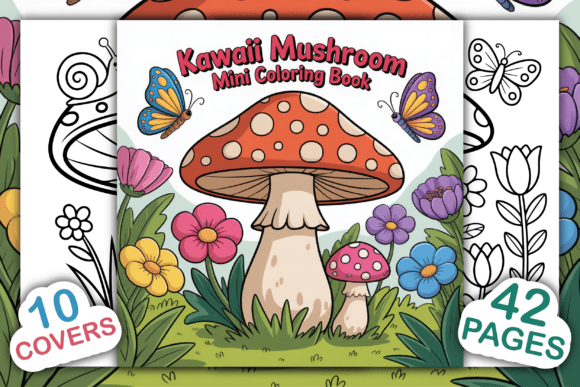
Kawaii Mushroom Mini Coloring Book
Creating a standout interior for a Kindle Direct Publishing (KDP) title requires more than just a collection of images. You need a cohesive, on-trend theme that resonates with buyers, offers clear value, and is ready for the platform’s technical requirements. The Kawaii Mushroom Mini Coloring Book is a focused, high-quality asset designed precisely for this purpose. Whether you are a seasoned self-publisher building your own catalog or a designer preparing interiors for clients, this resource combines a whimsical aesthetic with the production-ready files you need to move from concept to listing efficiently.
This article walks through what this coloring book interior actually delivers, where it fits in a publishing workflow, and how to use the included files to create a unique, sellable product on Amazon. The focus is on practical execution: preparation, customization, file management, and long-term listing performance.
What the Kawaii Mushroom Mini Coloring Book Interior Includes
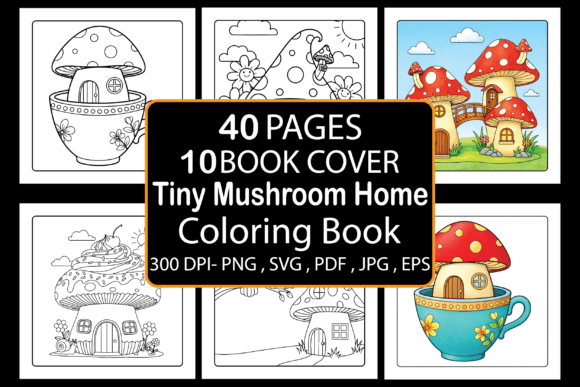
Before diving into workflow, it helps to understand exactly what you receive. This interior download is built around a specific niche—cute, miniature mushroom illustrations with a kawaii (Japanese “cute”) aesthetic. The theme appeals to both kids and adults, making it versatile for a range of books from children’s activity books to stress-relief coloring for adults.
The package arrives as a single ZIP file containing multiple file formats so you can edit, print, and upload without compatibility issues:
- 1 PDF file – print-ready, fully assembled interior (8.5” x 8.5”)
- 42 JPG images – individual coloring pages at high resolution
- 42 PNG images – individual pages with transparent or white backgrounds
- 42 EPS files – vector versions for scalable editing
- 42 SVG files – another vector format, useful for design software or cutters
- 10 book cover backgrounds – high-quality, ready for front/back cover design
All interior pages are black and white, optimized for print, and saved at high resolution. This is not a set of rough sketches—it is a bar-coded, tested KDP interior that meets Amazon’s upload standards.
Where This Fits in Your Publishing Workflow
Most KDP publishers follow a repeatable process: research a niche, source or create interior content, design a cover, format the manuscript, upload, and launch. The Kawaii Mushroom Mini Coloring Book interior fits squarely into the “source content” and “format manuscript” stages. Because the files come pre-sized to 8.5” x 8.5” and include a print-ready PDF, you can skip hours of formatting and image cleanup.
Here is how you might integrate it across different phases of a project:
Before Launch – Content Preparation
If you are planning a new coloring book series, this interior lets you test the kawaii mushroom niche without commissioning original art. You can use the vector files (EPS/SVG) to resize, recolor, or combine elements if you want a custom spin. For a first release, the 42-page PDF is fully ready to upload—just add a cover and you are live.
If you run multiple interior products, batch processing becomes simpler. The consistent file naming (JPG, PNG, EPS, SVG) means you can drag pages into Adobe InDesign, Canva, or Affinity Publisher with minimal sorting. Because 42 pages is a manageable count for a mini book (around 50 pages including front matter), the file size stays reasonable for KDP’s upload limits.
During Design – Cover and Interior Assembly
The included 10 book cover backgrounds speed up the cover design phase. These are high-quality images that match the cute mushroom theme, helping you maintain visual consistency between the cover and interior. You can layer your title, author name, and subtitle directly over these backgrounds in any design tool.
For the interior, the print-ready PDF serves as a baseline. If you prefer to add your own front matter—a title page, copyright page, or “This book belongs to” page—the JPG and PNG files let you assemble a new PDF in your preferred software. Because the pages are high-resolution black and white, you do not need to worry about color calibration for print.
After Launch – Iterating and Repurposing
Once the book is live, you can monitor which designs resonate most with buyers. If a particular mushroom character or page style gets positive reviews, the SVG/EPS files allow you to create derivative products: a second volume, a paperback edition, or even promotional coloring sheets for social media.
The mini-book format also lends itself to bundling. You could combine two or three mini coloring books (each covering a different kawaii theme) into a single larger volume. Because you have the source files, merging interiors takes minutes rather than days.
Practical Implementation Tips for a Unique Interior
To make your book stand out in Amazon’s search results, you need to go beyond the raw files. Here are actionable ways to customize this interior without starting from scratch:
Add Your Own Branding
Open the PDF or reassemble the JPGs in a layout tool. On the first or last page, add a simple “Created by [Your Brand Name]” line. You can also insert a small logo watermark on each page (subtle, so it does not distract from coloring). Branding helps with recognition if you publish multiple titles in the series.
Vary the Page Order for Variety
The 42 images are likely grouped thematically by the original designer. Shuffle the order so simpler line-art pages alternate with more detailed pages. This gives the user a natural rhythm—something quick to color followed by a more involved design—which improves the experience and can lead to better reviews.
Choose a Strong Book Title and Subtitle
Since the interior is themed around cute mushrooms, your title should reflect both the kawaii angle and the mini format. For example: “Kawaii Mushroom Mini Coloring Book: Cute Fungus Friends for Kids and Adults.” Subtitles can include phrases like “Easy and Adorable Designs” or “Stress Relief and Relaxation.”
Set the Right Trim Size and Bleed in KDP
The interior dimensions are 8.5” x 8.5” (a square format). When uploading to KDP, ensure your manuscript PDF includes the correct bleed (0.125” on each side) and that the cover matches the same trim. Because the provided files are pre-sized, you only need to double-check that your cover background extends to the bleed area.
Workflow Examples for Different Use Cases
This interior is not a one-size-fits-all product. Different publishers will integrate it differently based on their goals.
Example 1: First-Time KDP Publisher
A new user wants to launch a low-cost, low-risk book to learn the platform. They download this interior, open the PDF to confirm it looks clean, then design a simple cover using one of the included backgrounds. They add a copyright page (template from KDP’s help section) and upload. Total time from purchase to listing: under two hours. The 42-page length keeps printing costs low, allowing a competitive price point.
Example 2: Series Builder
An established publisher wants to launch a “Mini Kawaii” series of five books. They use the Kawaii Mushroom interior as the first volume. They then find similar themed interiors for other kawaii subjects (cute cats, unicorns, plants) and apply the same cover template style. The consistent 8.5” x 8.5” size and similar file formats make serial publishing smooth.
Example 3: Designer Creating for Clients
A graphic designer or freelancer purchases the interior as a base for client projects. They rebrand the front matter, adjust the page order, and may modify a few SVG files to add custom elements (e.g., a client’s mascot). The vector files are especially valuable here because they allow scaling and recoloring without losing quality.
Managing File Formats for Efficiency
One of the strongest aspects of this interior is the variety of included formats. Here is how each one supports a different part of your workflow:
- PDF: Use for immediate upload. No edits needed.
- JPG/PNG: Use for reassembling pages in Canva, Photoshop, or PowerPoint. PNG is best if you need transparent backgrounds for overlays.
- EPS/SVG: Use for vector editing in Adobe Illustrator, Inkscape, or Affinity Designer. Great for resizing elements, changing line thickness, or creating derivative art.
- Cover backgrounds: Use as a starting layer for your cover. Place text over the background and export a print-ready PDF.
For long-term storage, keep the original ZIP file archived. When you need to produce an updated edition (e.g., a second printing with a new cover), the source files let you make changes without hunting for the original design.
Quality Control and Testing
Before publishing, run through a short checklist:
- Page count: Ensure the interior has an even number of pages (the provided PDF is likely 42 pages; add front matter to reach an even total). KDP requires even page counts for print books.
- Bleed: Confirm that no critical content (like border art) falls within 0.125” of the edge. The provided pages are designed with bleed in mind, but check a few random pages.
- Color mode: Black-and-white interiors should be grayscale or black-and-white, not RGB. The PDF is likely already set correctly, but verifying avoids unexpected printing issues.
- File size: The PDF should be under 650 MB for upload. Mini coloring books with 42 images usually come in under 50 MB, so this is rarely a problem.
Long-Term Use and Scalability
This interior is not a single-use asset. Because you retain the files and the license allows you to sell the printed book on Amazon (KDP), you can create multiple editions over time. You might release a “Volume 1” and later a “Volume 2” using the same source vector files with minor variations. The 10 cover backgrounds also give you room to test different cover designs without buying new assets.
For publishers who track sales data, the mini-book format is forgiving. If a title underperforms, you have invested minimal time and cost. If it succeeds, you can expand the series or bundle it with other niche interiors.
Final Observations on Process Integration
The Kawaii Mushroom Mini Coloring Book interior excels when treated as a modular component in a larger publishing system. It is not merely a set of images—it is a production-ready building block that interacts seamlessly with design tools, KDP’s upload interface, and your own branding workflow. By understanding what each file format is best suited for, you can move through preparation, design, launch, and iteration stages with fewer friction points.
Publishers who approach this interior with a clear process in mind—testing the niche, customizing the cover, shuffling pages for variety, and uploading the print-ready PDF—will see the fastest path to a live listing. Those who want to dig deeper into vector edits or multi-product series will find the EPS and SVG files unlock long-term flexibility. The key is to treat the interior not as a finished product, but as a starting point that you shape around your audience, your brand, and your publishing goals.
With the right preparation and a clear understanding of how each file type fits into your personal workflow, this mini coloring book interior can become a reliable, repeatable asset in your KDP catalog.