Sheep Animals in Spring Coloring Book: A Practical Resource for KDP Publishers and Creators
If you create or publish low-content books for Amazon KDP, you already know the challenge: finding interior assets that are both original and production-ready. The Sheep Animals in Spring Coloring Book High-resolution Coloring Book page set offers a complete, multi-format package designed to streamline your workflow. Whether you are assembling a new title, refreshing an existing catalog, or building a series around seasonal themes, this collection provides the raw materials you need—from initial design to final print file.
What the Sheep Animals in Spring Coloring Book Includes and Where It Fits in Your Workflow
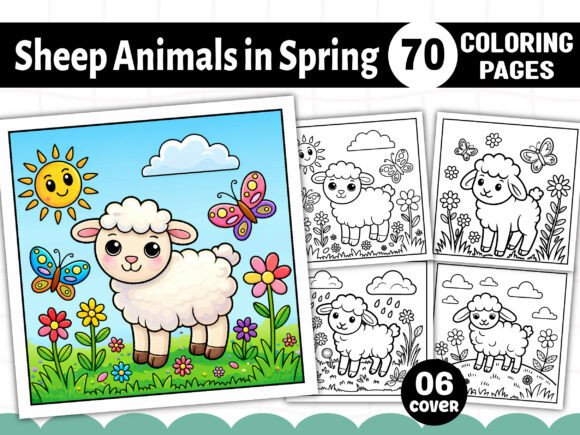
This interior download arrives as a .zip file containing everything you need to assemble a unique KDP coloring book. The set includes 70 distinct designs in five common formats: PDF, PNG, JPG, SVG, and EPS. Each page is black and white, optimized at 300 DPI, and sized at 8.5” x 8.5” (a square trim that works well for both print and digital distribution). You also receive a free set of 06 PNG book covers, which can save you time when creating your product listing.
In a typical publishing pipeline, this asset sits at the core of your interior production. After you have decided on your book’s theme—here, sheep animals in a spring setting—you can immediately open the EPS or PDF to check layout consistency, then use the PNG/JPG versions for previewing or mockups. The SVG files allow you to rescale elements without losing resolution, which is useful if you want to adjust margins, create variations, or combine designs across multiple pages.
Using the Collection Before, During, and After Your Project
One of the strengths of this package is how it supports each phase of a publishing project.
Before You Start: Planning and Preparation
Before you open your layout software, take time to review the designs included. The sheep motifs are spring-themed, which gives you a natural hook for seasonal marketing, bundled series, or niche audiences interested in farm animals, nature, or relaxation. Because you have access to both raster and vector files, you can test different page arrangements without committing to a final layout. For example, open a few PNG files in a folder and sort them by complexity. This lets you plan a balanced spread—simpler drawings for the beginning of the book, more detailed ones later—so the coloring experience feels progressive for the user.
You can also use this preview stage to decide on cover design. The free 06 PNG book covers included give you a head start; you can overlay your title, adjust colors, and create a cohesive look that matches the interior style. If you prefer to design your own cover, the EPS and SVG vectors give you the flexibility to extract individual sheep illustrations and build a custom front cover that echoes the interior.
During Assembly: Integration with Your Tools
When you are ready to compile the interior, the file formats matter. The 01 PDF file Print ready is your safest option: you can import it directly into KDP’s requirements with minimal adjustment. If you use Adobe InDesign, Affinity Publisher, or Canva, you can also drag in the JPG or PNG files as individual pages. For publishers who prefer vector editing, the EPS and SVG files keep lines crisp and allow you to modify stroke weights, adjust margins, or even add your own page numbers and borders.
One practical tip: because the designs are black and white, you can batch-import them into your layout software and apply consistent page margins (e.g., 0.125” to 0.25” on each side) to ensure nothing is cut off during printing. Use the 300 DPI JPG files for quick mockups or test prints on your home printer to verify that the line art remains clear at the intended size. The square 8.5” x 8.5” format works especially well for children’s books and adult relaxation titles, but it also fits standard print-on-demand trim sizes without extra scaling.
After Publication: Long-Term Use and Quality Control
Once your book is live on Amazon, you still have the asset files for future projects. The same designs can be repurposed into a second volume with a different cover, or you can extract individual SVG files to create digital coloring pages for your website, social media giveaways, or bonus content for email subscribers. Because the set includes 70 unique illustrations, you have enough material to build a multi-volume series without repeating artwork.
If you receive customer feedback about line weight or paper type, you can revisit the EPS files to adjust stroke thickness and regenerate a new PDF. This kind of iterative improvement is straightforward when you keep the source files organized. Store the .zip in your project folder, and maintain a subfolder for each format so you can quickly locate the version you need.
Practical Implementation Tips for Different User Types
This resource is useful for several audiences, and each can adapt it to their own workflow.
KDP Publishers and Self-Publishers
Your primary goal is speed and consistency. Use the 01 PDF file Print ready as your base interior. Open it in Adobe Acrobat or your layout program, check that all pages are in order, and add a table of contents or a “This page intentionally left blank” if needed. Then export a new PDF compliant with KDP’s specifications (CMYK, no bleeds if your margins are set, or add bleeds if you choose to extend the artwork). The free cover PNG files can be edited in Photoshop or Canva to create a complete book listing in less than an hour.
Because the set includes 70 JPG and 70 PNG files, you can also prepare a digital version for Kindle Create or EPUB delivery. Simply compress the PNG files to reduce file size while keeping 300 DPI, and upload them to KDP’s fixed-layout format. This gives you both a print and digital edition from the same source.
Educators and Activity Creators
Teachers, homeschoolers, and camp organizers can use the SVG and EPS files to adapt the sheep illustrations for different age groups. Scale up a single design to fill a full page for younger children who need larger areas to color, or combine multiple sheep on one page for older kids who enjoy detailed scenes. The spring theme aligns well with lessons about seasons, farm animals, or nature studies. You can create custom worksheets, activity packets, or even classroom posters by printing selected designs on standard letter paper or cardstock.
Hobbyists and Creative Entrepreneurs
If you run an Etsy shop or sell digital products, the multi-format package lets you offer variations of the same designs. Sell the complete PDF as a printable bundle, offer single JPG pages as instant downloads, or create SVG sets for users who want to edit in their own software. The black-and-white line art also works for sublimation transfers, embroidery patterns, or craft stencils. Because the designs are original and high resolution, you can maintain consistent quality across different product types.
Format-Specific Advantages for Your Production Pipeline
Each file format in the download serves a distinct purpose:
- PDF (01 file, print ready): Best for final proofing and direct upload to print-on-demand services. Open it, verify page order, and you are nearly done.
- EPS (01 file, print ready): Ideal for professional vector editing. Modify stroke weights, change line colors, or combine elements into new compositions.
- PNG (70 files): Great for digital previews, mockups, and online marketing. The transparent background (if included) lets you overlay designs on different backgrounds.
- JPG (70 files): Universal compatibility. Use these for quick printing, email attachments, or uploading to platforms that require standard image formats.
- SVG (70 files): Perfect for scaling and custom integration. Use them in web projects, cutting machines (like Cricut or Silhouette), or further vector editing.
Having all five formats means you never need to convert files, which saves time and avoids quality loss. If a client or collaborator requests a specific format, you already have it ready.
Organization and Efficiency: Keeping Your Files Structured
When you unzip the download, create a clear folder structure right away. A recommended setup:
- Master folder: “Sheep Animals Spring Coloring Book Interior”
- Subfolders: PDF, EPS, PNG, JPG, SVG, and Covers
- Keep the original .zip as a backup stored elsewhere (cloud or external drive)
This structure lets you find any file in seconds. When you work on a new book project, copy the relevant subfolder into your project folder and rename files to match your internal naming convention (e.g., “SpringSheep_01.svg”). Consistency here pays off when you produce multiple books per month.
Maintaining Quality and Consistency Across Projects
Because the designs are all sheep-themed and uniformly black and white, you can rely on a consistent look throughout the interior. Test a few sample pages in your print-on-demand software to confirm that the lines are dark enough and the background is pure white. If you notice any gray tones, adjust the PDF or JPG contrast settings before export.
For long-term use, store the EPS and SVG source files so you can regenerate any part of the interior if you decide to change trim size, add margins, or update the cover. The 300 DPI resolution means you can also enlarge any individual design for posters or promotional materials without pixelation.
A Note on Compatibility and Integration
The set works with virtually any design software that supports standard file types. Adobe Creative Suite, Affinity products, Canva (for JPG/PNG), Inkscape (for SVG), and even basic preview apps can open the included files. The EPS and SVG files are structured as clean vector line art, so you can edit them in vector editors without dealing with embedded raster layers. This makes it easy to adjust individual sheep, add your own backgrounds, or incorporate text elements like titles or page numbers.
If you plan to sell the finished book on Amazon, remember that only the interior pages are included—you still need to create a separate cover file, but the free 06 PNG covers give you a strong starting point. The interior PDF is already print-ready, so you can upload it to KDP after adding a few blank pages for the front matter (title page, copyright, etc.)
Final Thoughts on Integrating the Sheep Animals in Spring Coloring Book into Your Routine
Whether you are publishing one book or building a catalog of seasonal titles, this resource simplifies the creative and technical parts of the process. It offers multiple formats so you can work in your preferred software, and it provides enough designs to fill a full 70-page interior without repetition. By keeping files organized, testing a sample print early, and using the vector source files for future edits, you can turn this single download into a reliable asset for multiple projects. The spring sheep theme gives you a clear niche, and the high-resolution black-and-white artwork ensures your final product meets professional printing standards.