Summer Coloring Pages for Kids: Build a Profitable KDP Interior in Minutes
Creating a successful book on Amazon Kindle Direct Publishing requires more than a good idea. It demands a finished product that is technically sound, visually consistent, and ready for print. For publishers, entrepreneurs, and creators looking to enter the children's activity book market, the right assets make all the difference between a polished listing and a rejected file. KDP - Summer Coloring Pages for Kids provides a complete, high-resolution set of materials designed specifically for this purpose. This article walks through what this resource offers, how to integrate it into your publishing workflow, and what to consider for a smooth, repeatable process.
Understanding the Complete Interior Package
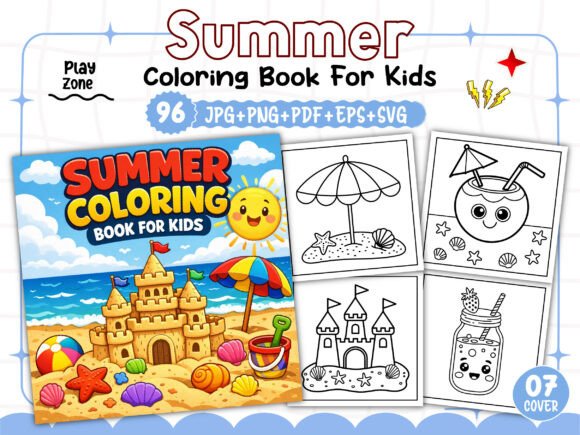
This collection is not a single file but a full suite of assets intended to streamline the book creation process. At its core, it includes 96 unique black-and-white coloring pages with a summer theme, all rendered at 300 DPI. The resolution is critical: 300 DPI ensures crisp, clean lines when printed, which is the standard Amazon requires for KDP interiors. Any lower, and your pages risk appearing blurry or pixelated after printing.
Beyond the pages themselves, the package supplies supporting files that cover the entire book build. You receive one print-ready PDF, one EPS file for vector editing, and separate folders containing JPG, PNG, and SVG versions of every page. This variety means you can work in whatever software you prefer—Adobe Illustrator, Canva, Affinity Publisher, or even free tools like Inkscape—without needing to convert formats manually. Additionally, seven PNG images for the book cover are included, saving you the extra step of sourcing or designing cover art from scratch.
Why Multiple File Formats Matter in Production
When you are assembling a KDP interior, compatibility with your design tools is not optional. The PDF file included here is print-ready, which means it has been tested for bleed, margins, and color space. You can upload it directly to KDP with minimal adjustments. However, if you want to rearrange pages, add your own branding, or combine this book with another project, the editable formats become essential.
- EPS files preserve vector data, allowing you to scale any element without losing quality. Vector formats are ideal if you plan to resize pages or adapt the artwork for different trim sizes.
- SVG files are similarly scalable and work well in web-based design tools or for creating supplemental digital products.
- PNG and JPG files at 300 DPI give you raster options that are immediately usable in any image editor. PNG supports transparency, which can be useful if you ever decide to combine pages with colored backgrounds or overlays.
Having all five formats at your disposal means you are never locked into a single workflow. If your usual software cannot handle one format, you have alternatives ready to go.
Where Summer Coloring Pages Fit in a KDP Workflow
Building a book from scratch involves several stages: planning, asset creation, layout, quality control, and upload. This product plugs directly into the asset creation and layout phases, saving dozens of hours of manual illustration work. Instead of commissioning original art or drawing each page yourself, you begin with 96 professionally designed pages that only need to be arranged into a book.
Before You Begin: Preparation and Planning
Even with pre-made pages, a few upfront decisions will determine how smoothly the rest of the process goes. The trim size for this interior is set at 8.5 x 8.5 inches, a square format that works well for children's coloring books. Square books are visually appealing and fit comfortably in small hands, but they also have specific bleed requirements on KDP.
- Confirm your book's page count. With 96 pages, you have a substantial interior that KDP can print as a paperback without issue.
- Decide whether you will use all 96 pages or select a subset. A shorter book might be priced lower, while a full 96-page book can support a higher list price.
- Plan your cover. The package includes 07 PNG images for the cover, but you will still need to arrange them into a front and back cover layout. Most publishers use Canva, Photoshop, or KDP's cover creator for this step.
Having these decisions made before you open any software prevents rework later. It also ensures that your book's metadata—title, subtitle, description, and keywords—aligns with the visual theme.
During Layout: Assembling the Interior
This is where the multi-format package truly shines. Open the print-ready PDF in your layout software and inspect the pages. Because the file has already been tested for KDP, you can use it as your starting point. If you prefer to build from scratch, import the individual JPG or PNG files onto your document pages, ensuring each image is placed within the safe margins.
Key layout considerations include:
- Adding a title page and copyright page at the beginning. KDP requires these for every book. You can create them in your design tool or use a template.
- Leaving the verso (left-hand page) of the title page blank or adding a simple note. Coloring books often have a single-sided design to prevent bleed-through, but since these pages are black and white, printing on both sides is acceptable if you use quality paper.
- Checking page order. The 96 pages are sequential, but you might want to shuffle them so that similar themes (beach scenes, ice cream, sun activities) are spread throughout the book rather than clustered.
Because each page is a standalone illustration, you can easily reorder, remove, or duplicate pages depending on your target length. The SVG and EPS files allow you to edit individual elements if you want to add your own branding, such as a small logo or website URL at the bottom of each page.
After Layout: Quality Control and Upload
Pre-made assets reduce the chance of errors, but they do not eliminate the need for review. Before uploading, run through a short checklist:
- Verify that all images are 300 DPI. If you exported from a vector editor, confirm that the export settings did not downsample.
- Check that your PDF includes proper bleed. The standard bleed for KDP is 0.125 inches on each side. Your print-ready PDF should already have this, but if you rebuilt the file, double-check.
- Test the file with KDP's online previewer. Amazon provides a tool that simulates how your book will look on a Kindle or in print. Use it to spot any missing pages, misaligned images, or font issues.
- Review your cover files. The 07 PNG images included should be assembled into a single cover file that matches your interior trim size. KDP's cover template generator can help with dimensions.
- Cover design: The 07 PNG images give you a head start. Use them to create a bright, engaging cover that stands out in search results.
- Book description: Write copy that speaks to parents and caregivers. Highlight the number of pages, the summer theme, and the skill-building benefits of coloring.
- Keywords and categories: Choose categories that are specific but have enough search volume, such as "Children's Coloring Books" or "Summer Activity Books."
Once you upload and pass review, your listing can go live. Because the interior is fully tested on the KDP platform, the risk of rejection due to formatting problems is low.
Practical Implementation Tips for Long-Term Use
This product is suitable for a single book release, but it also supports a broader content business. If you plan to publish multiple coloring books, the workflow you establish with this first title becomes repeatable. Here are a few ways to extend the value of this asset pack beyond one listing:
Create Multiple Variations
Because you have editable vector files, you can create different versions of the same interior. For example, you could produce a black-and-white edition (the original), a grayscale edition with subtle shading, or a version with slightly thicker outlines for younger children. Each variation can be published as a separate book with its own cover and listing, targeting different age groups or price points.
Combine with Other Themed Packs
Summer coloring pages pair naturally with other seasonal or holiday packs. If you own or acquire additional themed interiors, you can mix pages from different collections to create hybrid books. A "Seasons Coloring Book" could include a subset of summer pages alongside spring, fall, and winter designs. The consistent format (300 DPI, 8.5 x 8.5, black and white) makes blending assets seamless.
Build a Series
Children's coloring books sell well in series. After publishing a summer book, you can release a "Spring Coloring Pages," "Autumn Coloring Pages," and "Winter Coloring Pages" using the same template structure. Readers who enjoy the first book are likely to search for similar titles from the same publisher. Keeping the trim size, paper quality, and overall design consistent across your series builds brand recognition.
Technical Considerations and Compatibility
This interior download is designed specifically for Amazon Kindle Direct Publishing. The files are print-ready and tested on that platform. If you plan to sell the same book on other platforms like IngramSpark or Etsy, verify their specifications separately. While 300 DPI and 8.5 x 8.5 are common standards, bleed and margin requirements can vary.
The package includes one EPS and one SVG file, which are vector formats. These are best opened in Adobe Illustrator, CorelDRAW, Affinity Designer, or Inkscape. If you do not have vector software, the JPG and PNG folders provide raster alternatives that work in any image editor. The print-ready PDF can be opened and edited in Adobe Acrobat Pro or imported into layout software like Affinity Publisher or Canva.
Note that this product is licensed for use on Amazon KDP only. If you plan to repurpose the artwork for merchandise, physical products, or other distribution channels, you would need a separate license. For KDP publishing, however, the permissions are clear and straightforward.
Integrating Coloring Pages into a Broader Publishing Strategy
Coloring books are one of the most accessible niches on KDP. They require minimal text, no complex formatting, and appeal to a wide audience. However, the market is also competitive. Using pre-made interiors like this summer pack allows you to enter the space quickly without sacrificing quality. The key differentiator becomes your cover design, your book description, and your marketing approach.
Because the interior is already high-resolution and print-ready, you can focus your time on the aspects of publishing that directly impact sales:
When your interior is solid, these marketing elements become the main levers for growth. You are not debugging formatting issues or redrawing lines at the last minute. Instead, you are making strategic decisions that drive visibility and conversions.
Final Observations on Workflow and Consistency
Using a pre-made interior pack does not mean you are taking shortcuts. It means you are allocating your effort to the parts of the publishing process where you add the most value. The illustration work is already done at a professional level. Your job is to arrange, package, and present it in a way that meets Amazon's standards and appeals to buyers.
If you are new to KDP, this package provides a low-risk entry point. The tested files remove much of the guesswork, and the multiple formats give you room to experiment with layout and design. If you are an experienced publisher, the same assets allow you to scale your catalog quickly, adding a new title without starting from zero.
Either way, the goal is a finished book that you can upload confidently and that customers will enjoy. With the right preparation and a clear workflow, KDP - Summer Coloring Pages for Kids becomes a tool that supports both creative satisfaction and business results.