Balloon Animals Puppy Coloring Pages: Build Your Own Unique KDP Interior
Creating a profitable low-content or no-content book on Amazon KDP requires more than a good idea. It demands a reliable asset pipeline, consistent design quality, and a clear understanding of how each element fits into your publishing workflow. Balloon Animals Puppy Coloring Pages offer a focused, ready-to-use resource for anyone building a coloring book interior—especially if you want to deliver a cohesive theme without starting from zero. This article walks through what these pages are, how they integrate into your production process, and how to use them to build a unique interior that stands out in a competitive category.
What Balloon Animals Puppy Coloring Pages Deliver
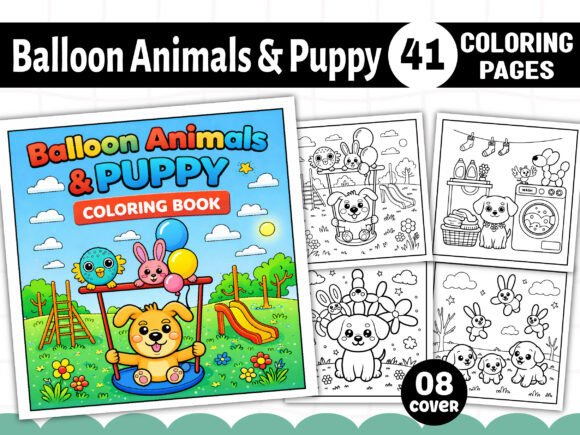
At its core, this collection provides 41 individual black-and-white coloring page designs centered on a puppy balloon animal theme. Every page is delivered in multiple formats—PDF, PNG, JPG, SVG, and EPS—so you can work in whatever software or workflow you prefer. The dimensions are fixed at 8.5” x 8.5” square, which is a popular trim size for children’s and adult coloring books on KDP. Resolution sits at 300 DPI, which meets Amazon’s print requirements and ensures sharp, clean lines when the book is printed or viewed on screen.
What makes this set practical rather than just decorative is the format variety. You are not locked into a single file type. If you design in Canva or Affinity Publisher, you can use the PNG files directly. If you work in Adobe Illustrator or Inkscape, the SVG and EPS files give you editable vectors. The PDF comes print-ready, which means you can bypass layout work entirely if you just want to assemble pages in order. The JPG versions work as quick placeholders or for preview builds. This flexibility is useful when you are testing different interior layouts or need to produce proofs for different trim sizes.
The set also includes eight bonus PNG cover files. Cover design is often a bottleneck for new publishers. Having pre-made cover assets that match the interior theme saves you time and ensures visual consistency between what buyers see on the listing and what they get inside the book.
Where These Pages Fit in Your Publishing Workflow
Understanding where a resource fits in your process is more useful than simply knowing it exists. Balloon Animals Puppy Coloring Pages can be used at several stages of a book project, depending on your role and goals.
Before the Project: Planning and Asset Sourcing
If you are mapping out a new coloring book, the first question is usually about theme. Balloon animals are a recognizable, low-stakes subject that appeals to both children and adults who enjoy whimsical, stress-free coloring. Puppies add warmth and familiarity. Combining both into one theme gives you a clear market position. You can decide early whether this set will form the entire interior or serve as a supplement to other pages you create or license.
During planning, you can use the file variety to test layouts. Open one SVG in your design tool and adjust margins, add bleed, or resize elements to see how they fit on a page. Because the files are black and white, you can also experiment with adding background patterns, borders, or text overlays without worrying about color conflicts. The cover PNGs let you mock up a full book listing in hours, which helps you gauge whether the theme has visual shelf appeal before you invest in a full interior build.
During the Project: Interior Assembly and Customization
This is where the set delivers the most value. You have 41 unique designs. For a typical 50–70 page coloring book, that means you can fill the majority of your interior with original content from one source. The remaining pages can include a title page, copyright page, table of contents, or blank test pages.
The workflow for assembly depends on your toolchain. Here is one practical approach using free or low-cost software:
- Open the PDF in a program like Adobe Acrobat Reader or PDFsam. Reorder pages if needed, then export individual pages as high-resolution PNGs.
- Import each PNG into Canva (free version works) or Affinity Publisher. Use the 8.5” x 8.5” preset. Add a thin border or keep the design full bleed—just remember to set your bleed and trim marks appropriately for KDP.
- Export the assembled interior as a single PDF. Amazon requires PDF/X-1a or PDF/X-3 for print books. Most design tools can export to these standards.
- If you want to customize pages further, open the SVG or EPS files in Inkscape or Illustrator. You can modify line thickness, remove elements, combine designs, or add your own details like shading guides or text prompts such as “Color me happy!”
Because all 41 designs share a consistent theme and style, you do not need to spend time matching art styles across different sources. That alone eliminates a common quality control headache. Every page feels part of the same book.
After the Project: Quality Control and Iteration
Once your interior is assembled, run a thorough check. Print a physical proof or use a digital preflight tool. Look for issues like missing bleed, cut-off designs, or pages that look too similar in composition. The SVG and EPS files are especially helpful here because you can open a design, check the vector paths, and verify that no elements fall outside the safe zone.
If you find a page that feels repetitive, swap it out for a different design from the set. The 41-page count gives you buffer to remove weak pages without running short. You can also reuse rejected designs in a second volume or a companion activity book, which extends the long-term value of the asset.
How This Resource Interacts with Other Tools and Decisions
No asset exists in isolation. Your success with these coloring pages depends on how well you integrate them into your broader publishing system. Here are a few practical connections to consider:
- Design software compatibility: The EPS and SVG formats work with professional tools, but they also work with free options like Inkscape or Vecteezy Editor. If you are a beginner, start with PNG files in Canva. If you need precise control over line art, use SVGs in a vector editor.
- Print-on-demand requirements: KDP accepts PDF interiors with embedded fonts and high-resolution images. These pages already meet the resolution requirement. You just need to ensure your assembled PDF includes proper margins, bleed, and no transparency issues. Use the PNG format if your export tool struggles with SVG or EPS transparency.
- Cover design integration: The eight bonus cover PNGs give you a head start. Import one into your cover design software, add your title text and author name, and adjust colors if needed. Because the cover assets match the interior theme, your product listing will feel cohesive from the thumbnail to the inside pages.
- File organization: Keep the original .zip file intact as a backup. Inside your project folder, create subfolders for originals, edited versions, and final exports. This saves time when you revisit the book months later for updates or re-releases.
Practical Implementation Tips for Smooth Production
Getting from raw files to a published book involves a series of small decisions. Here are observations from real production workflows that can save you time and reduce friction:
Prepare Your Template First
Before you import any coloring page, set up your KDP interior template. Use the 8.5” x 8.5” dimensions with 0.125” bleed on all sides. Draw a margin guide inside the safe zone (typically 0.375” from the trim edge). Then import each design and ensure the main content stays within that safe zone. This prevents elements from being cut off during printing or trimming.
Use the EPS Files for Batch Processing
If you have Adobe Illustrator or CorelDRAW, EPS files give you the most editing flexibility. You can batch-process all 41 files using actions or scripts to resize, add borders, or convert to grayscale. This is efficient when you want to apply a uniform style to every page, like adding a decorative frame or a small footer with the page number.
Test Print Before Full Commit
Select three pages at random. Print them on your home printer at actual size. Check that the lines are crisp, the white space is clean, and the design feels comfortable to color. If the lines are too thin or too close together, adjust the stroke weight in your vector editor before you finalize the entire interior.
Consider Page Sequencing
Not all designs need to go in random order. Group similar compositions together. Place simpler, larger designs near the front and more detailed, intricate designs toward the back. This creates a natural progression that keeps colorists engaged as they work through the book.
Keep a Style Log
If you plan to create multiple coloring books, document which designs you used in each volume. Note any modifications you made. This avoids accidentally reusing the exact same page in a different book and helps you build a consistent series identity.
Quality Control and Consistency Considerations
Even with pre-made assets, quality control remains your responsibility. Here are factors to check before you upload:
- Line clarity: Open a few PNG files at 100% zoom. Lines should be smooth, not pixelated. If you see jagged edges, use the vector files instead.
- Page parity: Ensure every page has a design. A blank page in the middle of the book can confuse buyers. If you want blank pages, group them at the beginning or end.
- File naming: Rename your final PDF something clear like “balloon-dog-coloring-book-interior-v1.pdf”. Avoid names with special characters or spaces when uploading to KDP.
- Preview check: Use Amazon’s online preview tool after upload. Scroll through every page to confirm alignment, crop, and readability. This catches issues your local PDF viewer might not show.
Long-Term Use and Scaling Your KDP Work
One of the practical realities of self-publishing on KDP is that a single book rarely builds a sustainable income. You need multiple titles, ideally in a series or across related niches. Balloon Animals Puppy Coloring Pages can support a long-term strategy in a few ways:
- Volume 1, 2, 3: If you have 41 designs, you can split them across two or three smaller books (20 pages each) and release them sequentially. Use the same cover style and branding for instant series recognition.
- Bundle offers: Combine this set with other themed coloring pages—like balloon animals with cats, dinosaurs, or fantasy creatures—to create a larger compilation. KDP allows up to 100 interior pages in black and white, so you have room to bundle.
- Repurpose assets: The SVG and EPS files can be recolored or simplified to create activity pages, mazes, or dot-to-dot worksheets. This expands your product line without sourcing entirely new content.
- Update cycles: When a book stops selling, you can update the interior with different designs from the same set, refresh the cover, and re-publish as a new edition. This keeps your catalog fresh without starting from scratch.
The formats also allow you to create digital versions for platforms like Gumroad or Etsy. Export pages as individual JPGs for digital download bundles. The PNG files work well for apps or tablet coloring. Each format opens a different distribution channel, all from the same source files.
Final Observations on Using This Set in Your Routine
The value of a resource like Balloon Animals Puppy Coloring Pages is not in the files themselves—it is in how you integrate them into a repeatable production process. When you have a reliable source of high-resolution, thematically consistent art, you can focus your energy on layout, cover design, listing optimization, and marketing. Those are the activities that directly affect sales. The art becomes a foundation rather than a distraction.
For busy creators, professionals, and small publishers, the ability to open a single download and immediately start building a book interior is a significant time saver. You do not need to hire a designer, search for royalty-free images, or worry about inconsistent styles. You simply choose your tools, assemble the pages, and publish. That simplicity, combined with format flexibility and print-ready quality, makes this set a practical addition to any KDP workflow—whether you are publishing your first book or expanding an existing catalog.
If you are ready to build a unique interior, start by extracting the files, opening the PDF in your preferred layout tool, and testing a few page arrangements. From there, the process follows a clear path: assemble, check, export, upload. The rest is iteration and volume. With 41 designs across five formats, you have everything you need to create a professional, cohesive coloring book that stands out in a crowded marketplace.